The Content Database Support and Remote BLOB Storage Myth
There’s a popular myth that keeps popping up that I wanted to post about.
Why is it so popular? Well, because it seems intuitive if you aren’t working with SharePoint on a regular basis. If you are then I’m sure you don’t think this… and if you did, well shortly you’ll know the truth.
So here’s the myth “We don’t need to split our content across separate content databases because if we need more than 200GB support for each database we will [1] move subsites around to different site collections in different databases or [2] use remote blob storage and put it all on file shares… then we’ll have a very small content database size.”
SharePoint 2013: Search Suggestions Not Working After Configuration
Simple trap to avoid when configuring SP2013 Search - once you’ve set up search suggestions, they won’t automatically show when you do a search.
The reason for this is that behind the scenes there is a timer job that performs the processing of the search suggestions you’ve added.
To have the suggestions appear immediately, you need to run this command in PowerShell:
Start-SPTimerJob -Identity “prepare query suggestions”
Architectural Mistakes to Avoid #1 - Interstate Stretched Farm
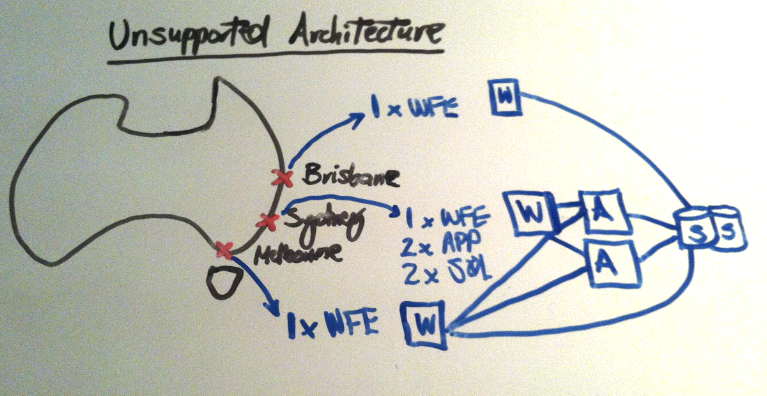
In discussions with IT Pro’s at client sites, a few times I have seen them start off designing their farm to handle performance requirements for interstate users (e.g. Brisbane, Sydney, Melbourne) by having the core of the farm in Sydney, and then one web front end in Brisbane and another in Melbourne. Essentially an architecture that looks like this:
What’s the challenge here?
The challenge is that technically it won’t be supported by Microsoft, because what has essentially been created here is a stretched farm, that has a packet latency of > 1ms between the WFEs (W), App Servers (A) and SQL Servers (S). So why isn’t an environment like this supported? Because it will cause performance problems, as all the internal farm servers need to communicate with one another quickly. To get an idea for how significant the performance will be degraded, the typical statistic quoted is 50% per 1ms delay, ouch!
How To Add a Custom Thesaurus in SharePoint 2013
Bella Engen recently posted a useful 101 walk through on how to use a custom Thesaurus for SharePoint 2013 Search which you can find here.
Adding a thesaurus can be incredibly useful to get the most out of SharePoint Search, because not all users search for content with the same keywords or phrases. Furthermore, as your business evolves, you will typically have product, service or business unit names change over time - and having thesaurus can help unlock this… however it is important to know that you’ll often need a combination of a Thesaurus + Query rules, which Steve Mann explains in detail here.
New SharePoint 2013 Search Articles
It’s really great to see the wealth of knowledge regarding SharePoint 2013 Search being captured and shared by various bloggers amongst the community, and also I’m happy to see a lot of fresh content from Microsoft, which shows just how committed they are to ensuring the success of the product.
Here are a bunch of new Search related posts from Microsoft in the last month or so:
SharePoint 2013 and Office 365 Feature Matrix Spreadsheet
Andrew Connell has recently posted a fantastic feature matrix spreadsheet for SP2013 and Office 365 - based on this Microsoft TechNet article.
It’s much easier to digest because you can use Excel to filter for all of the “Yes” values or all of the “No” values and see very quickly what is or isn’t included in Foundation, Standard and Enterprise versions.
[caption id=“attachment_119” align=“alignnone” width=“839”]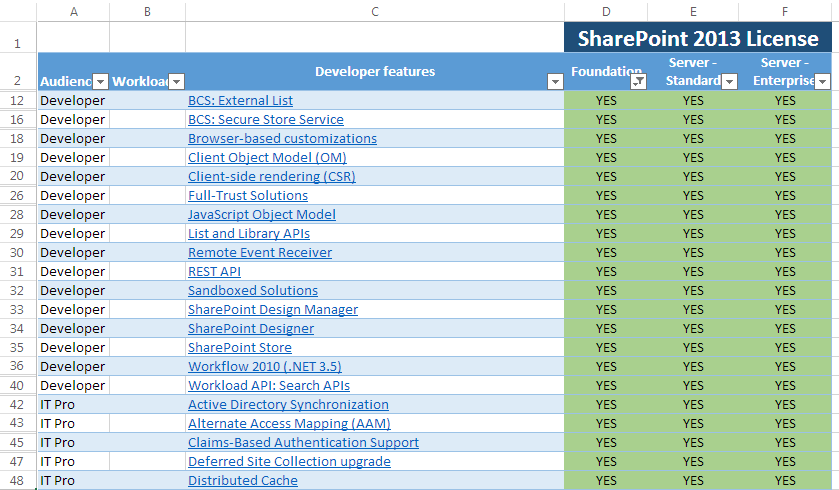 SharePoint 2013 Feature Comparison Maxtrix Spreadsheet[/caption]
Anti-Virus Solutions for SharePoint 2013
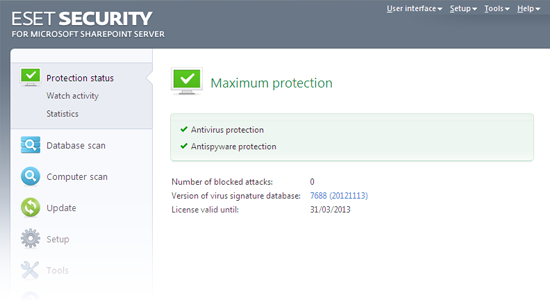
Well it seems that due to the earlier release of SP2013 than many vendors expected, at the moment there is only one anti-virus vendor that supports SharePoint 2013 other than Microsoft - ESET. ESET’s product also is only Beta - so this isn’t really ideal for production usage just yet.
Microsoft of course have ForeFront Protection for SharePoint 2010 however the whole ForeFront product line has been discontinued, so you cannot buy it. If you have an Enterprise Agreement, and want to get it - perhaps speak with your Microsoft Account Manager and they may be able to help you out, depending on your agreement and when you speak with them. If you do already have it, you’ll be supported until 31st December 2015 and receive anti-virus definition updates until then. From that point onward, you’ll need to migrate to another product. This was flagged by Spencer Harbar here.
Unsupported Installation Scenarios on SP2013
Understanding the scenarios in which SharePoint is not supported are extremely important when designing SharePoint farms; as if you experience any trouble with your environment and need to get Microsoft support involved, they typically won’t be able to help you, and will instead ask you to get your environment in a supported state.
On SP2013 it is important to note that these scenarios are not supported:
-
Installation on a machine that is not joined to a domain (i.e. a machine in a workgroup)
SharePoint 2013 vs. FAST Search for SharePoint 2010
Ok so the key differences between SP2013 and Fast Search for SharePoint 2010 are officially up on TechNet.
In summary, a number of features have gone. Some people may be upset, though overall I think the majority of changes make sense because it simplifies the platform. FAST for SharePoint (FS4SP) included a number of features that were baked in from FAST ESP (the standalone, pre-Microsoft product) and became redundant when SharePoint was added to the mix.
Improved: Developer Dashboard in SP2013
The developer dashboard was a great new feature when SP2010 was released, and now with SP2013 it has been further improved, with the key changes being:
-
The Dashboard now appears in a separate window - it isn’t rendered out at the bottom of the page you are diagnosing any more.
-
Cumulative page requests are shown, instead of just the last request. This certainly helps in SP2013 given the use of Minimal Download Strategy (MDS).